Client Effects
info
Learn how to define tools that let the agent trigger client-side effects.
Client effects push model-generated “side-effect events” to the frontend for execution without interrupting model reasoning, and they return a server-configured default value to the model. Use them for UI updates, focus, highlighting, animations, and state sync—situations that only affect the frontend and do not depend on a returned value.
Core capabilities
- No interruption: does not wait for the frontend to respond
- One-way notification: model → frontend UI
- Automatic return value: uses the middleware-configured Result
- Strong UI control: the model can “drive UI changes”
Workflow
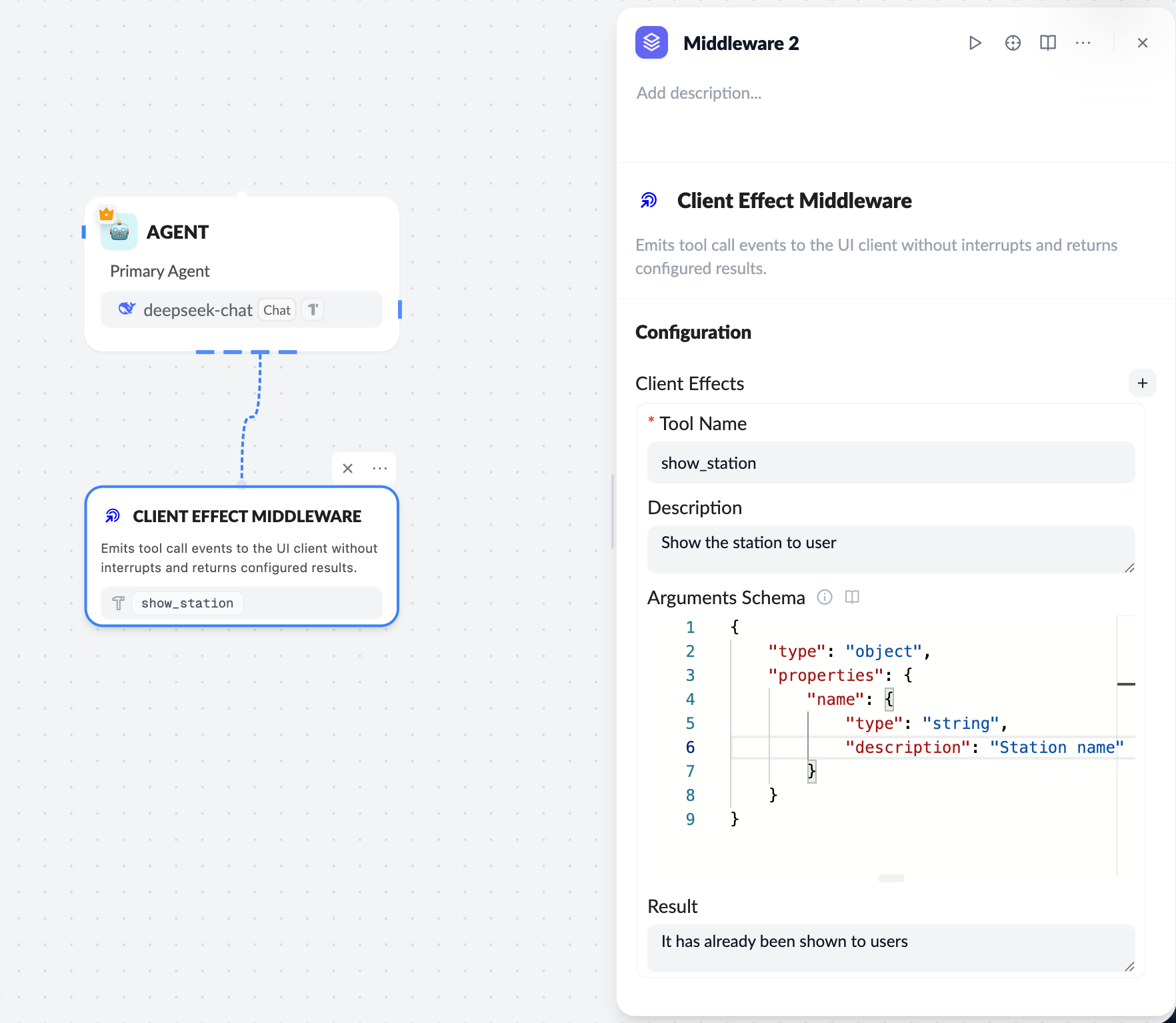
- Configure the Client Effect middleware on the server
- Define
Tool Name / Description / Arguments Schema - Configure a fixed
Result
- Model triggers the effect
- The LLM calls the effect tool (for example,
show_station)
- Frontend receives and executes
- ChatKit sends the event via
onEffect - The frontend performs the UI side effect (state update, focus, etc.)
- Model continues reasoning
- It does not wait for frontend completion
Server configuration essentials
Tool Name
show_station
Arguments Schema (example)
The schema must follow the JSON Schema spec:
{
  "type": "object",
  "properties": {
    "name": {
      "type": "string",
      "description": "Station name"
    }
  }
}
Result
It has already been shown to users
Frontend (React) integration
Register onEffect in useChatKit:
const handleClientEffect = useCallback(
  ({ name, data }) => {
    if (name === 'update_mindmap' && data?.mindmap) {
      setMindmap(convertMindmapFromSnake(data.mindmap));
    }

    if (name === 'focus_node' && data?.nodeId) {
      focusNode(data.nodeId);
    }
  },
  []
);
useChatKit({
  ...
  onEffect: handleClientEffect,
});
Client Tool vs. Client Effect
| Item | Client Tool | Client Effect |
|---|---|---|
| Interrupts reasoning | ✅ Yes | ❌ No |
| Waits for frontend result | ✅ Yes | ❌ No |
| Dynamic result | ✅ Yes | ❌ No (fixed Result) |
| Best for | State reads / user confirmation | UI updates / display / focus |
Best practices
- Effects handle UI side effects only; keep business decisions elsewhere
namemust exactly match the server tool namedatashould include only the minimal fields needed by the frontend- Avoid long-running or blocking tasks inside effects
Client effects let the model declaratively drive UI behavior, which is key for building visual, highly interactive agent experiences.